
A practical guide from Packaging in Time to help you choose better materials, structure, printing, and finishing for custom boxes.

Electronics brands often approve a retail package before anyone has tested the packed device, cable, charger, manual, and shipper together. The result can be a carton that looks right on a shelf but allows movement, scuffs a finish, hides a barcode, or fails during parcel handling. Custom electronics boxes need to solve more than presentation.
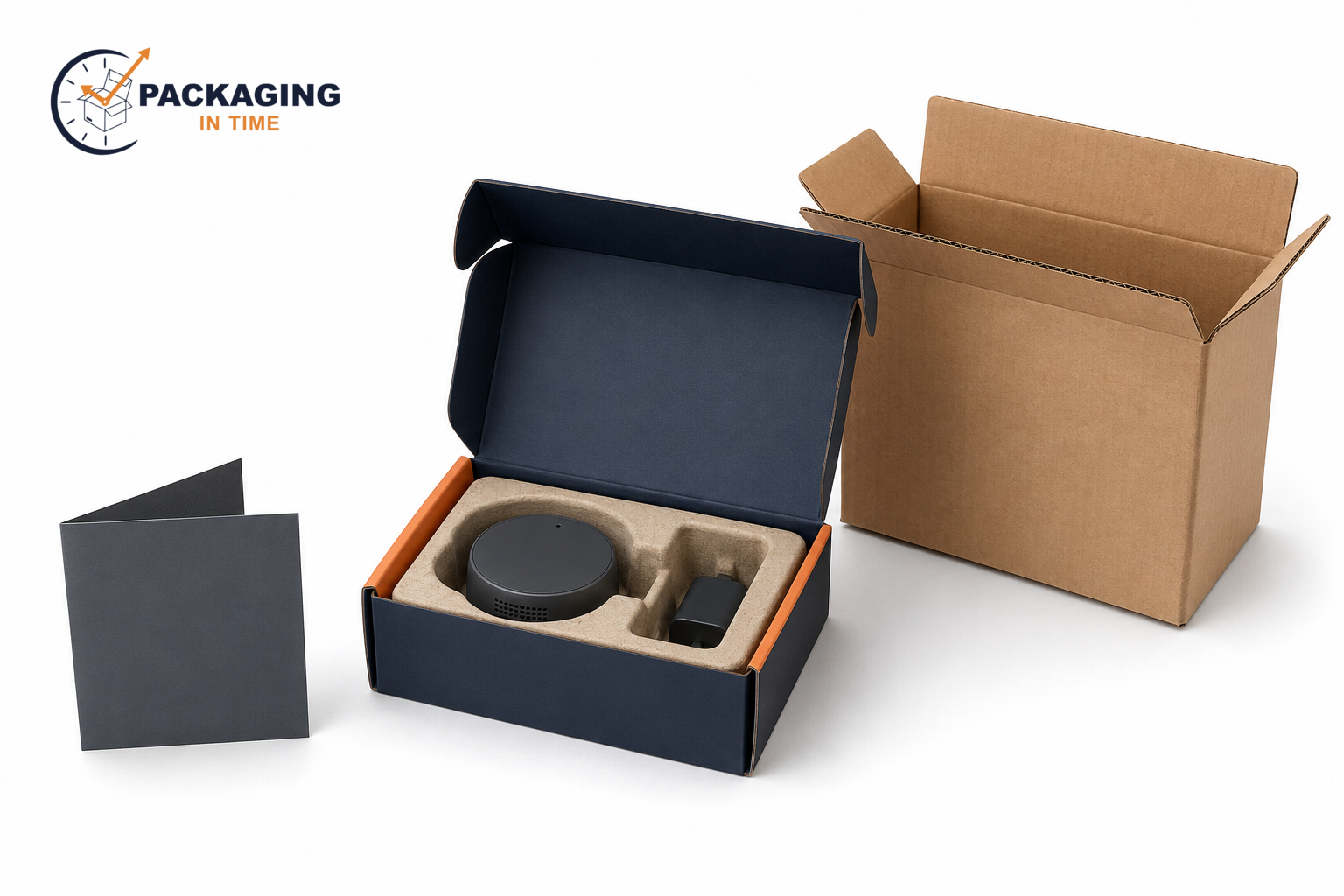
Custom electronics boxes can combine a printed folding carton or rigid presentation box with fitted inserts, ESD-aware packaging components, and a separate corrugated shipping layer. Each layer has a distinct job. The retail package presents the product and carries customer-facing information. The insert retains the product and accessories. Protective ESD materials manage static risk for susceptible items. The shipper handles distribution hazards.
This guide explains how to choose a box structure, size the packed product, specify inserts, separate ESD controls from ordinary cushioning, plan print and barcode areas, review battery shipping needs, and test the finished pack. It is written for brands and procurement teams that need a practical specification before requesting a quote.
A retail package, a fitted insert, and a transport shipper should be specified as related but separate layers.
What Custom Electronics Boxes Need to Do
Custom electronics boxes are printed retail, presentation, or shipping packages built around an electronic device and its accessory set. The structure must define where the device sits, how it is removed, where accessories are separated, what information appears on the outside, and what additional package protects the finished unit in transit.
The same device can need different packaging for different channels. A compact charging accessory sold in a retail store may use a folding carton with a small paperboard insert. A flagship headphone or smart-home device may use a rigid set-up box with a molded-pulp tray.
A circuit board supplied to an assembler may need an ESD-protective material system plus a corrugated shipper. The product does not decide the box alone. The sales channel, handling route, accessories, and risk profile also matter.
Separate retail presentation from shipping protection
Retail packaging and shipping packaging should not be treated as interchangeable. A retail carton holds the visual identity, product name, model information, instructions, barcode, and legal text required by the brand or retailer. It may be made from paperboard, use a window or sleeve, and be designed for shelf-facing presentation.
A corrugated shipping box manages outer handling. Corrugated fiberboard uses linerboard with a fluted medium between the liners. The flute profile adds separation and bending resistance, which is why the shipping layer can protect a packed retail unit from loads and impacts that a decorative carton is not designed to manage. A brand that needs both functions should specify the retail unit and the shipper as a package system.
For a general structure overview, see custom product boxes. The final electronics specification still needs the device dimensions, packed weight, channel, and actual handling route.
Map the product and accessory set before the dieline
The product map should include every item that will be in the final package: device, charger, cable, adapter, mount, spare part, manual, warranty card, battery, protective bag, and insert. A design based only on the main device often creates an accessory cavity that is too shallow, a cable that presses against the product, or a manual that bends at the closure.
Measure the final packed product, not a preliminary render. Record length, width, depth, protruding connectors, screen location, lens location, cable bend radius, accessory stack height, and the product's orientation during opening. Then add the clearances required by the chosen retention method. A tight cavity can pinch a button or surface. Excess free space can permit impacts.
A dieline is the production drawing that defines the cut line, fold or score lines, bleed, safe zone, glue area, and structural panels. It should be created after the product layout is settled, not before. The printer's template controls the final bleed and safety values because they depend on the print process and box construction.
Choose the Right Electronics Box Structure
Electronics box structures should be selected by product weight, fragility, number of components, store presentation, storage conditions, and distribution method. There is no single "electronics box" that fits every device.
Folding cartons for retail electronics
Folding cartons are paperboard boxes that ship flat and are erected during packing. They work well for cable sets, small speakers, smart plugs, routers, chargers, wearables, light accessories, and other products where a printed retail surface is needed without a rigid presentation format.
Straight tuck end, reverse tuck end, auto-bottom, sleeve, and tray styles each have different closure and assembly characteristics. A light device may work in a standard tuck structure. A heavier product or a large accessory set may require a locking bottom, a fitted tray, or an external shipper. The selected structure should be evaluated with the actual product inside, especially where a product can press against a tuck flap or tear a thumb notch.
Rigid set-up boxes for premium devices
Rigid set-up boxes use thicker board construction and normally remain assembled. A lid-and-base box, shoulder-neck box, or wrapped tray-and-lid format can present headphones, premium accessories, gaming peripherals, cameras, smart-home products, and launch kits in a controlled sequence.
Rigid packaging adds a visible sense of structure, but it is not automatically a shipping container. It still needs an insert that fixes the product position and, for parcel distribution, often needs a corrugated overbox. A rigid box with a loose device can be damaged despite having thick walls.
The outside wrap, interior paper, foil, embossing, debossing, soft-touch coating, and ribbon pull should be specified against the real handling cycle. Dark full-coverage wraps and tactile finishes can show rub marks. A pre-production sample should assess the look after packing, closure, stacking, and transport testing rather than only under studio lighting.
Corrugated mailers and shipping overboxes
Corrugated mailers can protect a direct-to-consumer electronics pack while also carrying branded artwork. A die-cut mailer with locking tabs suits products that need an integrated transit package. A regular slotted case is more common for multi-unit distribution, replenishment, or master packs.
The right outer box depends on packed size, weight, void space, stack conditions, carrier route, and whether the retail unit is already sufficiently retained. Right-sizing matters. An oversized shipper can add dimensional shipping cost and leaves more space for the product to gain momentum during an impact.
For a broader starting point on structures, materials, and print options, review custom packaging boxes. For electronics, the product's fragility and channel should drive the final choice.
Sleeves, trays, and two-piece boxes
A sleeve slides over a tray and can hold the main branding surface while the tray supports the device and insert. The format works for compact accessories, keyboards, devices with a presentation tray, and kits where the user removes the sleeve before seeing the product.
Two-piece boxes use a separate lid and base. They work for premium devices and giftable bundles but need attention to lid friction, finger access, insert height, and the risk of the product lifting with the lid. A shallow tray can expose a device edge. A deep tray can make removal difficult. Test the opening experience with the expected user, not only the packer.
Fit, Retention, and Protective Inserts
An insert retains, separates, cushions, or organizes the components inside custom electronics boxes. It is where much of the package's protective work happens. The box wall contains the product, but the insert controls the space between the product and that wall.
Measure the packed product, not only the device
Start with the heaviest, tallest, most fragile, or most protruding production variant. A sample that fits a smooth prototype may fail when the retail product includes a larger cable, plug, battery cover, protective film, or updated housing.
Retain the device at stable contact points. Avoid pressing on display surfaces, tactile controls, lens covers, antennas, vents, charging pins, or sharp corners unless the product engineer has approved that contact. The insert should keep components from touching each other and should provide a defined removal point. A finger notch, pull ribbon, or controlled cutout can help, but each feature changes the retention strength.
Molded pulp, paperboard, foam, and partitions
Molded pulp forms a fiber-based tray around a specific product geometry. It can create separate cavities for a device and accessories, reduce loose-fill use, and provide a natural paper-fiber appearance. Its fit and surface quality depend on tooling, fiber, moisture condition, product geometry, and the required tolerance.
Paperboard inserts can be folded or die cut into platforms, dividers, and retainers. They are useful for lighter devices, accessory separation, literature pockets, and retail packs that need efficient flat shipment before assembly.
Foam inserts can be die cut, routed, or formed around particular components. Foam should be specified by the product surfaces it contacts, the desired compression response, the device weight, and the distribution hazards. "Foam insert" alone is not enough for a production quote.
Partitions create cells between components. They can separate multiple devices, cables, adapters, replacement parts, or retail units within a master case. A partition controls lateral movement but may need additional top or bottom retention if components can bounce vertically.

Why an insert needs a movement test
A visual fit check is not enough. Assemble the final device, accessories, literature, bag, and closure. Turn the pack through the orientations it will see during packing and shipment. Listen for movement. Then inspect whether cables migrate, adapters strike the product, or the device climbs out of its cavity.
The practical test sequence should include the actual packout process. A cavity that is easy to use on a workbench can be too slow or error prone on a packing line. If product orientation matters, add a feature that makes incorrect loading obvious. A correctly fitted insert reduces damage risk, but it also improves count control and the consistency of the opening experience.
ESD Packaging Is a Separate Protective System
Electrostatic discharge can damage or degrade susceptible electronic parts. The risk is relevant to products such as circuit boards, exposed assemblies, components, and some devices during manufacturing, storage, or technical distribution. It is not a decorative claim for every retail electronics box.
The EOS/ESD Association identifies ANSI/ESD S541 as the standard that defines packaging properties for electrostatic-discharge-sensitive items through production, transport, and storage. The packaging selection must support the applicable ESD control program and the product's actual susceptibility. Read the ESD Association overview of packaging standards before using an ESD claim in a requirement or artwork file.
Identify ESD-sensitive products
An ESD-sensitive item is an electronic item that can be affected by electrostatic discharge. The product owner or engineering team should identify that status. The packaging supplier can help specify compatible materials and formats, but the product's sensitivity threshold, handling environment, and validation requirements belong in the packaging brief.
Do not assume that a finished consumer device needs the same packaging approach as a bare board or component. A device may have an outer housing that changes the risk. A bare assembly may require a more controlled material sequence. The distinction affects the inner bag, tray, label, handling instruction, and packing environment.
Low-charging, dissipative, conductive, and shielding materials
Low-charging materials are selected to limit charge generation during handling. Dissipative materials allow charge to flow away at a controlled rate. Conductive materials allow charge to move more readily. Shielding materials are used to reduce exposure to electrostatic fields or discharge events from outside the package. These are functional properties, not color descriptions.
An ESD-protective system may include a static-shielding bag, a compatible foam or tray, a tote or box, handling labels, and rules for opening the pack within an ESD-protected area. A conventional black foam, pink bag, or printed carton should not be called ESD safe unless its properties and use are specified and validated for the product and program.
Do not treat an ESD label as proof
An ESD symbol or warning label can communicate a handling requirement. It does not turn ordinary material into a protective system. The material stack, enclosure, opening procedure, test basis, and documentation determine whether the required protection is actually present.
For consumer-facing packaging, the ESD element may be inside the branded carton. The consumer should see the intended retail package, while the technical inner package protects the sensitive item until the approved point of opening. That division keeps technical control from overwhelming the product presentation.
Materials, Printing, and Retail Information
Paperboard, corrugated fiberboard, greyboard, wraps, inserts, films, and adhesives form a packaging system. The chosen material should match the structure, product geometry, handling route, desired finish, and recovery conditions.
Paperboard, corrugated fiberboard, and greyboard
Paperboard supports folding cartons, sleeves, and printed trays. It ships flat and carries detailed graphics well. Corrugated fiberboard adds a fluted medium between liner sheets and is commonly used for mailers, shippers, and heavier protective formats. Greyboard forms the structural core of many rigid set-up boxes and is commonly wrapped with printed paper.
Material choice changes not only appearance but also assembly, storage, print behavior, edge quality, and protection. A supplier needs the box style, internal dimensions, packed weight, distribution method, and finish requirements to recommend a material combination. For related material vocabulary and options, see Packaging in Time's custom packaging box guide.
CMYK, spot color, coatings, and scuff control
CMYK process printing combines cyan, magenta, yellow, and black inks for multicolor artwork. A spot color is a separately specified ink system used where a particular brand color or effect is required. Color expectations should be approved against the final substrate, printing method, proof, and lighting conditions. A digital file alone cannot guarantee a finished color match.
Varnish, aqueous coating, lamination, soft-touch coating, and anti-scuff coating can change appearance and rub resistance. They can also change barcode contrast, fold behavior, surface friction, and recovery conditions. Specify the finish by its location and purpose. For example, a matte wrap with a glossy logo area is more actionable than a request for "premium finish."
Barcode placement and variable information areas
Retail barcode areas need adequate contrast, a clean background, and a protected quiet zone, which is the clear area around the symbol needed for reliable scanning. Do not place a code across a fold, seam, thumb notch, foil edge, heavy texture, or curved surface unless the retailer and print supplier have approved it.
GS1 provides barcode placement guidance for retail point-of-sale codes, including placement and human-readable-text considerations. See the GS1 2D barcode retail guideline when a package uses 2D symbols. The retailer may have additional requirements, so final placement should be approved before production.
Reserve separate areas for serial numbers, batch identifiers, model variants, regulatory text, QR codes, retailer labels, and return labels. These are variable-data areas. They should be shown on the dieline and included in the artwork review. A controlled file version, proof status, and approval owner reduce artwork mixups.
Lithium Batteries and Transport Review
Lithium batteries are common in electronics, but battery transport is not a generic box-design issue. The correct shipping controls depend on whether the battery is contained in equipment, packed with equipment, shipped alone, new, damaged, recalled, returned, or sent for disposal. Transport mode and destination also affect the review.
The U.S. Pipeline and Hazardous Materials Safety Administration states that lithium batteries are regulated as hazardous materials under the Hazardous Materials Regulations. Its lithium battery shipper guidance uses scenario-based instructions because the requirements vary by configuration. The brand or shipper should confirm the actual product classification, packing instructions, marks, labels, documentation, and carrier rules before shipping.
Custom electronics boxes can provide product retention, a retail information panel, and space for required outer-pack information. They do not, by themselves, make a battery shipment compliant. The outer shipping package, protection against short circuits, approved configuration, and shipment paperwork should be reviewed as a separate transport workstream.
Test the Complete Packaged Product
Package testing should evaluate the device and package together. An empty carton can survive a drop even though its product moves, the insert breaks, the cable contacts a screen, or the closure opens under load.
Prototype fit, assembly, and cosmetic review
A digital proof verifies artwork representation, layout, color intent, and variable-data placement. A physical prototype verifies structure, fit, insert performance, assembly sequence, finish, and packout. They answer different questions.
Use the final device, actual accessories, and representative product weight in the physical review. Confirm that the packer can assemble the unit consistently. Check that the consumer can remove the product without tearing the carton, damaging the insert, or dropping the device. Inspect surfaces after repeated opening and after realistic stacking.
Drop, vibration, compression, and closure performance
ISTA describes package testing as an evaluation of the packaged product's protective performance under stresses such as vibration and shock. Its procedures also recognize that the product and package are considered together. The ISTA 3A overview is a useful starting point for parcel-distribution thinking, but a test plan should match the product, route, packaged weight, and customer requirement.
Drop testing can reveal device movement and corner failure. Vibration testing can expose migration or rubbing between accessories. Compression testing can show whether a shipper protects the retail box under stacking. Closure checks confirm that tuck tabs, mailer locks, lids, and seals remain functional. Record the product configuration, packout steps, sample condition, and pass criteria so the result can be repeated.
Custom Electronics Box Use Cases
Consumer devices and accessories
Earbuds, chargers, cables, power accessories, keyboards, mice, speakers, wearables, and small peripherals often need a compact retail carton with clear accessory separation. The main decisions are device orientation, cable containment, product removal, barcode placement, and whether the retail pack requires an external shipper.
Smart-home and connected products
Smart sensors, hubs, cameras, plugs, and home-control devices may include mounts, adapters, cables, wall hardware, and printed instructions. The insert should prevent hardware from contacting lenses or finished housings. The package also needs a clear location for model identification, setup information, and retailer code requirements.
Components and B2B technical products
Circuit boards, modules, test equipment, sensors, and service parts may require ESD-aware materials, component separation, traceability labels, and more controlled packing procedures. The branded outer carton can still provide product identity, but the technical inner packaging must be specified by the product's handling and ESD requirements.
Common Specification Errors
Several errors repeat across electronics packaging projects.
Choosing the box before mapping the accessory set. This leads to loose cables, damaged literature, and ad hoc void fill.
Treating a retail carton as the shipping package. A shelf-ready box may need a separate corrugated overbox for parcel distribution.
Using an unverified insert. A device may fit visually but move during vibration or impact.
Calling ordinary packaging ESD safe. Color, an ESD symbol, or generic foam is not a complete ESD specification.
Placing a barcode over a fold or finish effect. Retail scanning depends on print quality, contrast, quiet space, and approved placement.
Adding a battery product late in the process. Battery configuration can change the shipper, shipping marks, and transport review.
Approving only a digital proof. Artwork approval does not verify the physical product fit, finish, closure, or packout.
How to Order Custom Electronics Boxes
Start a quote with a product brief that allows the packaging team to recommend a structure rather than guessing from a product category.
1. Define the product and channel. State whether the unit is for retail, direct-to-consumer, wholesale, technical distribution, or a launch kit.
2. Provide the packed-product details. Share internal product dimensions, packed weight, accessories, fragile surfaces, battery status, and the heaviest or tallest variant.
3. Select package layers. Identify the retail carton, insert, protective inner pack, corrugated shipper, and master case separately.
4. Choose the structure and material direction. State whether a folding carton, rigid box, sleeve, tray, mailer, or shipper is required, plus desired print and finish.
5. Send artwork and variable-data needs. Include brand colors, logos, legal copy, barcode files, serial-number areas, QR codes, and approval owner.
6. Request a proof and prototype. Use the proof for artwork review and the sample for fit, assembly, opening, and handling evaluation.
7. Confirm test and delivery conditions. Share the distribution route, retailer requirements, destination, quantity, required date, and any test or compliance documentation needed.
Packaging in Time can help turn these inputs into a production-ready custom box specification. The most useful quote request is specific about the device and the route, not just the desired appearance.
Frequently Asked Questions
What is the best box material for electronics?
The best material depends on the package layer. Paperboard often suits printed retail cartons. Greyboard is common for rigid presentation boxes. Corrugated fiberboard is used for shipping protection. An ESD-sensitive item may also need specified inner protective materials. Use the product, channel, packed weight, and validation requirement to choose the material stack.
Do all electronics boxes need ESD protection?
No. ESD protection depends on the product's susceptibility and the handling environment. A bare circuit board and a finished consumer device may need different controls. The product owner should identify the ESD requirement, and the packaging system should then be selected and validated against that requirement.
Can a rigid electronics box be shipped directly?
Sometimes, but it should not be assumed. A rigid box may need a corrugated overbox, an appropriate insert, and testing for the intended route. Direct shipping decisions should consider the product weight, closure, insert retention, parcel handling, and carrier requirements.
Can a molded-pulp insert replace foam?
It can in some applications, but the decision depends on geometry, product surface, retention, compression response, moisture conditions, and shipping hazards. Test the full packaged product before making the change.
Where should the barcode go on an electronics box?
Use a flat, high-contrast area away from folds, seams, cuts, foil, and heavy textures. Preserve the required quiet zone and confirm the final position with the printer and retailer. If the code changes by model or region, identify it as a variable-data area in the dieline review.
Request a Custom Electronics Box Quote
Custom electronics boxes work best when the product, insert, ESD requirement, printed retail surface, and shipping layer are treated as one controlled package system. Start with the device dimensions, packed weight, accessory set, required opening sequence, sales channel, and destination. Then select the folding carton, rigid packaging, corrugated shipper, or tray-and-sleeve format that fits that system.
Add a prototype when the device has a fragile screen, lens, unusual geometry, multiple accessories, a battery, or a static-sensitive component. Use a physical sample to check fit and assembly, then test the complete packed product against the distribution route. Send Packaging in Time your product details, artwork, barcode requirements, desired finish, quantity, and required date to discuss a custom electronics box quote.